
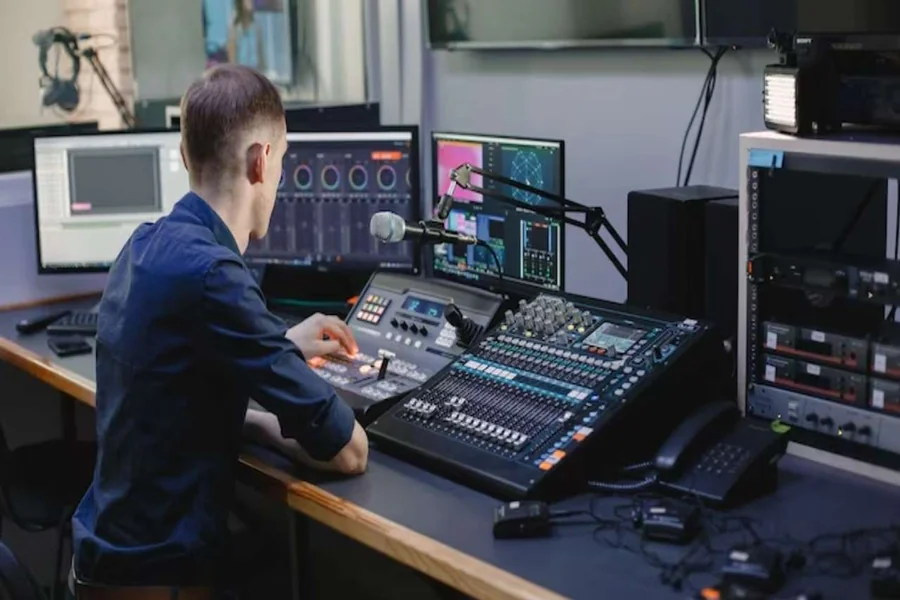
Setting up a professional audio video system can transform your business environment, conference room, or entertainment space. However, the difference between a mediocre setup and an exceptional one often lies in the quality of installation. Poor AV installation can lead to audio feedback, visual distortion, and system failures that disrupt important presentations or events.
Professional audio video installation ensures your equipment performs at its peak while providing the reliability your business demands. The right installation approach maximizes your investment, minimizes downtime, and creates seamless user experiences that leave lasting impressions on clients and colleagues.
This comprehensive guide walks you through every aspect of professional AV installation, from initial planning to long-term maintenance. Sound Effects AV team helps you navigate these complexities with proven strategies and expert insights that ensure your system delivers exceptional performance for years to come.
Understanding Your AV Installation Needs
Before selecting equipment or running cables, a thorough needs assessment forms the foundation of any successful installation. Start by evaluating your space’s primary functions. Will you host large presentations, conduct video conferences, or create immersive entertainment experiences? Each use case requires different technical approaches and equipment configurations.
Room acoustics play a crucial role in audio quality. Hard surfaces like concrete walls and glass windows create echoes and reverberation that can make speech difficult to understand. Soft furnishings, carpet, and acoustic panels help absorb unwanted reflections. Consider how your room’s shape, size, and materials will affect sound distribution.
Lighting conditions significantly impact video quality. Natural light from windows can wash out projected images, while artificial lighting may create glare on screens. Plan your display placement to minimize these challenges and consider controllable lighting solutions that adapt to different presentation needs.
System design should accommodate future growth and changing requirements. Design your installation with expansion in mind, including extra cable runs, additional power outlets, and scalable equipment choices. This forward-thinking approach saves significant costs and disruption down the road.
Selecting the Right Equipment Components
Audio equipment selection depends heavily on your room size and intended use. For small conference rooms, a simple wireless microphone system and ceiling speakers may suffice. Larger spaces require more powerful amplification, distributed speaker systems, and professional mixing capabilities.
Video displays come in various technologies, each with distinct advantages. LED displays offer superior brightness and color accuracy but require higher budgets. Projection systems provide larger images at lower costs but need controlled lighting environments. Consider viewing distances, ambient light levels, and content types when making your selection.
Control systems unify your AV equipment into user-friendly interfaces. Basic systems use simple push-button panels, while advanced solutions offer touchscreen controls, automated presets, and remote monitoring capabilities. Choose control complexity that matches your users’ technical comfort levels.
Cable infrastructure represents the nervous system of your AV installation. Quality cables ensure signal integrity over long distances, while proper cable management prevents interference and simplifies maintenance. Don’t overlook this critical component—poor cables can undermine even the best equipment.
Professional Installation Process
Pre-installation planning prevents costly mistakes and delays. Create detailed drawings showing equipment locations, cable routes, and power requirements. Coordinate with other trades like electricians and IT professionals to ensure proper infrastructure support.
Cable installation requires careful attention to signal types and interference sources. Keep audio cables separate from power lines to prevent hum and noise. Use appropriate cable grades for your distances and signal types. Label every cable clearly for future troubleshooting and modifications.
Equipment mounting demands both aesthetic considerations and practical accessibility. Wall mounts should use appropriate anchors for your wall type and equipment weight. Ceiling installations require proper structural support and clearance for ventilation and maintenance access.
System commissioning involves more than just connecting components. Proper calibration ensures optimal performance from every element. Audio systems need level matching, delay compensation, and frequency response tuning. Video systems require color calibration, resolution optimization, and display alignment.
Troubleshooting Common Installation Issues
Audio problems often stem from improper gain staging or ground loops. If you hear buzzing or humming, check for electrical interference from nearby equipment or improper grounding. Feedback issues typically result from microphone placement too close to speakers or excessive system gain.
Video signal problems manifest as flickering images, color distortion, or complete signal loss. Check cable connections first, then verify that source and display resolutions match. Long cable runs may require signal amplification or different cable types to maintain quality.
Control system malfunctions can render your entire installation unusable. Verify power connections to all components and check network connectivity for IP-based systems. Many control issues result from programming errors rather than hardware failures.
Network connectivity problems affect modern AV systems that rely on IP connections. Ensure your network infrastructure provides adequate bandwidth and prioritizes AV traffic. Interference from other wireless devices can disrupt wireless microphone and presentation systems.
Maintaining Your AV System Performance
Regular maintenance schedules prevent small issues from becoming major problems. Clean air filters in projectors and amplifiers monthly to prevent overheating. Dust accumulation on connectors can cause intermittent signal problems, so gentle cleaning with appropriate solutions helps maintain reliable connections.
Software updates keep your system secure and functioning optimally. Many modern AV components receive firmware updates that improve performance and add new features. However, test updates in non-critical environments first to avoid disrupting important events.
Component lifecycle management helps you plan replacements before failures occur. Keep spare lamps for projectors, backup microphones, and replacement cables readily available. Document your system configuration and warranty information for quick reference during emergencies.
User training ensures your investment delivers maximum value. Create simple operation guides with clear step-by-step instructions. Regular training sessions help users feel confident with the system and reduce support calls.
Maximizing Your Professional AV Investment
Professional audio video installation represents a significant investment that pays dividends through improved communication, enhanced presentations, and reduced technical difficulties. Quality installation work ensures your system operates reliably when you need it most, whether for crucial client meetings or important company announcements.
The expertise that Sound Effects AV team brings to your project eliminates guesswork and prevents costly mistakes. Professional installers understand the nuances of acoustic design, signal routing, and system integration that separate good installations from exceptional ones.
Start your professional AV installation project by clearly defining your requirements and consulting with experienced professionals. The right partnership between quality equipment and expert installation creates systems that exceed expectations and provide years of reliable service.