
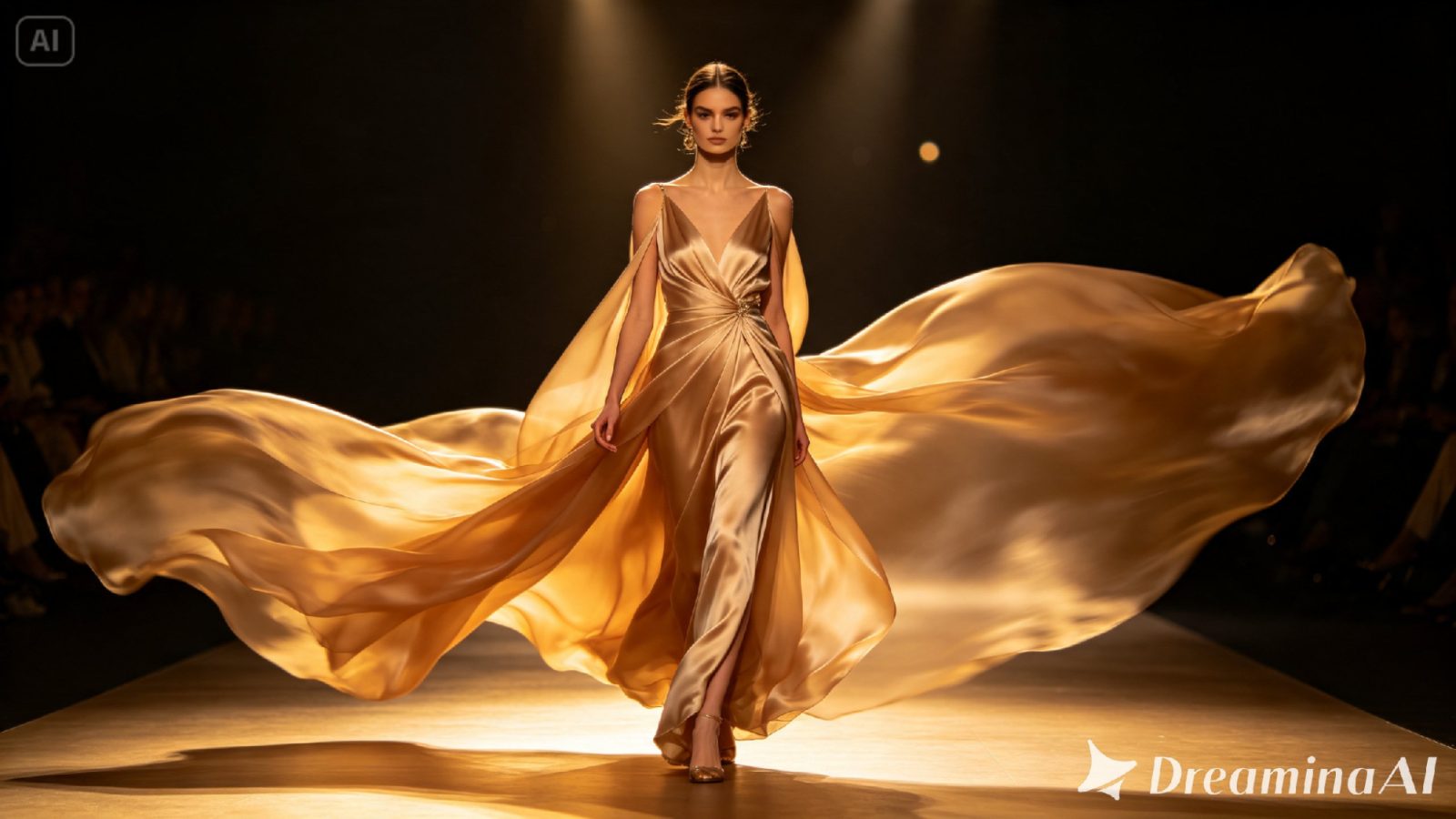
A sketch nails the silhouette. It can’t tell you what the fabric actually does once someone starts walking in it, though; that’s always been the gap between a drawing and the real thing. Text to video tools have closed it. Dreamina’s Seedance 2.5 takes a flat sketch, or just a written description, and lets the garment move like it would on an actual body.
Why fashion design already thinks in movement
Designers are already picturing motion while they sketch. How a hem will swing. How a sleeve catches light the second an arm lifts. How a collar sits once someone turns their head. None of that’s new information. When you write it promptly, you’re just putting words to what was already sitting in your head while you drew the thing.
Choosing the moment that shows a garment at its best
You don’t need the full runway walk to sell a design. Honestly, one well-chosen movement usually does more work than the whole sequence would. A few moments tend to hold up well:
- A turn — that’s where fabric shows the most motion.
- A single stride that reveals how a hem or sleeve actually behaves
- A near-still pause, letting lighting and texture get a moment to breathe
Go with whatever movement shows off the detail you care about most. A full runway sequence spreads attention too thin; one focused beat keeps the eye exactly where the design deserves it.
What makes a fashion prompt actually useful
Just naming the garment gets you something flat. What Seedance 2.5 actually needs is fabric weight, movement, and lighting. Heavy silk doesn’t move like light chiffon; that difference alone is what makes or breaks how convincing the fabric looks once the model starts walking. Even naming the fastenings matters more than people expect. Buttons settle differently than a zipper. A zipper settles differently than something tied.
Your three-step path from sketch to finished scene
Step 1: Enter your prompt and add your sketch
Head to Dreamina’s AI Video section. Got a sketch or a reference photo lying around? Upload it through “Add reference image” to anchor the design, then describe how the fabric should move and where the scene’s happening. No image on hand? Work straight from text to video and just describe the garment in full.
Here’s an idea for a clip: A model walks slowly across a dimly lit runway in a deep red silk gown, fabric rippling and trailing with each step; dramatic side lighting catches the sheen of the material; the camera tracks alongside at hip height before rising to her face as she turns.
Step 2: Choose Seedance 2.5 and generate
Select Seedance 2.5 once the prompt’s set; it handles fabric physics and walking motion with real nuance. Pick a length that fits the moment. Then an aspect ratio: 9:16 for social content, 16:9 if it’s meant to feel more like a runway film. Hit generate, give it a few seconds.
Step 3: Refine the movement and export
Watch it once it comes back. Does the fabric move the way you pictured it? Upscale sharpens texture detail like weave and sheen. Generate soundtrack adds ambient runway sound or music underneath if you want it. Export once it’s ready for a lookbook, a pitch, wherever it’s headed.
Meet Seedance 2.5, the model that understands fabric
Seedance 2.5 shifts the input fed to the model, going far beyond a mere line of text.
Up to 50 assets in one pass
Storyboard scripts, reference or style images, character designs, audio or soundtrack references, and shot descriptions can all be submitted at once, enabling the model to create from a full brief rather than a prompt.
One-click filmmaking, closer to reality
It moves AI farther up the process chain – rather than creating a snippet and iterating through prompts, the creator can simply submit the assets that would be used in an ordinary shoot.
Multilingual by default
Input is provided in a variety of languages, with special attention paid to Chinese, English, Spanish, Indonesian, and Malay, as well as full support for Thai, Arabic, Portuguese, Vietnamese, Japanese, and Korean.
Choosing lighting that flatters the design
Lighting does almost as much work as the material itself. Harsh, direct light flattens texture. Angled, warmer light pulls weave and drape out into view. Deciding the lighting setup before you write the prompt matters just as much as describing the garment does. A backlit scene will bring out translucency in something like chiffon; a softer front light favors structured fabrics like wool or denim instead.
Where these fashion video concepts are already being used
These clips have moved well past runway shows at this point. Independent designers pitch a collection with one before committing to a full photoshoot. Brands use them for social content that actually shows a garment moving instead of sitting frozen in a photo. Design students present concepts this way before they’ve touched a single yard of fabric. A sketch that used to stay flat on paper can now show exactly how it moves, and thanks to Seedance 2.5, it looks convincing enough to actually guide production decisions, not just illustrate an idea.
Bringing a fashion sketch to life used to mean a full photoshoot. Real models, real fabric, the whole production. With Dreamina and the fabric-aware precision of Seedance 2.5, that same design can be seen in motion before a single yard of material gets cut, and it costs nothing close to what an actual shoot would.