
Introduction
Marketing campaigns are all about grabbing attention — and few tools do that as effectively as a well-designed flyer. Even in a world dominated by digital ads and social media, the humble flyer remains a powerful, affordable, and personal way to connect with people. Whether you’re promoting a new store opening, announcing an event, or launching a limited-time offer, flyers are your best friend for spreading the word.
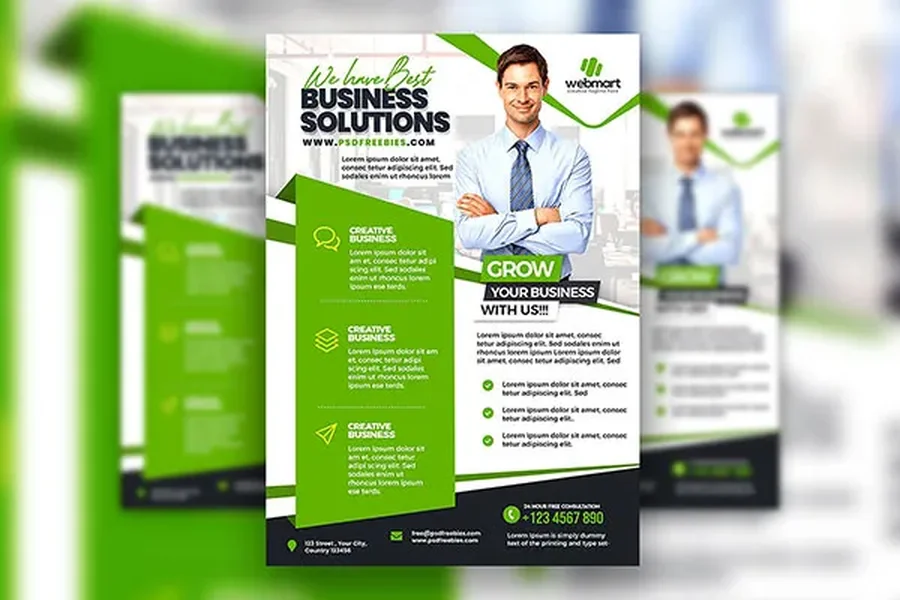
The good news? You no longer need a professional designer or expensive software to make stunning flyers. With the help of online design platforms, you can create and download a free printable flyer in just a few minutes. This guide will take you through the entire process — from choosing a design to customizing it for your marketing campaign — all while keeping it simple, professional, and cost-effective.
Why Flyers Are Still a Marketing Essential
In today’s digital-first world, it’s easy to underestimate the power of print marketing. But flyers continue to deliver incredible results — especially for local and small business campaigns. Here’s why:
- Affordable and Accessible: You can design and print flyers at little to no cost, making them perfect for startups or small businesses.
- Tangible Engagement: Unlike digital ads, flyers give customers something physical they can hold, read, and even save for later.
- High Reach in Local Areas: Perfect for local promotions — whether it’s distributing them at malls, community centers, or events.
- Customizable for Any Campaign: From real estate promotions to restaurant openings, flyers can be tailored to any purpose.
In short, flyers help bridge the gap between offline and online marketing — giving your campaign a human touch while still being easy to share.
Step 1: Plan Your Marketing Message
Before you jump into the design process, take a moment to plan your message. A flyer has limited space, so every word and image should have a purpose.
Ask yourself:
- What is the goal of my flyer? (e.g., promote a sale, announce an event, attract new customers)
- Who is my target audience?
- What action do I want readers to take after seeing it? (e.g., visit a website, call a number, visit a location)
Once you know the answers, you can craft a clear and compelling message that speaks directly to your audience. Remember, a good flyer doesn’t just inform — it persuades.
Step 2: Choose the Right Design Platform
There are plenty of free design platforms online that make flyer creation simple, even for beginners. Tools like Canva, Adobe Express, and VistaCreate offer drag-and-drop editors and thousands of customizable templates.
When choosing your platform, look for one that allows you to:
- Start from a free printable flyer template
- Customize colors, fonts, and images
- Download your design in high resolution (PDF or PNG)
- Print directly or share digitally
Most of these platforms also include built-in image libraries and stock photos, saving you time searching for visuals elsewhere.
Step 3: Pick a Template That Fits Your Campaign
Choosing the right template can make or break your flyer. Templates are designed for specific purposes, so look for one that aligns with your campaign’s goals.
Here are some popular flyer categories to consider:
- Event Flyers: Ideal for concerts, festivals, workshops, or fundraisers.
- Business Promotion Flyers: Perfect for showcasing products, sales, or services.
- Real Estate Flyers: Highlight property listings with images, pricing, and contact info.
- Restaurant Flyers: Feature mouthwatering images, special offers, or new menu launches.
Once you’ve chosen your template, it’s time to make it your own.
Step 4: Customize Your Flyer Design
This is where your creativity comes into play. A great flyer is visually appealing, easy to read, and aligned with your brand identity. Here’s how to achieve that:
1. Use Brand Colors and Fonts
Stick to your brand’s color palette for consistency. Use no more than two or three colors to maintain balance. Choose fonts that are easy to read — one for the headline and one for the body text.
2. Add Eye-Catching Images
Visuals grab attention faster than text. Use high-quality images relevant to your campaign — product shots, event photos, or illustrations.
3. Write a Strong Headline
Your headline should be short, bold, and engaging. It’s the first thing people notice, so make it count. For example:
- 50% Off This Weekend Only!
- Join Our Grand Opening Celebration!
- Your Dream Home Awaits!
4. Include Essential Information
Always include key details like date, time, location, contact info, and website links. Don’t overwhelm your design — keep it clear and focused.
5. Add a Call-to-Action (CTA)
A flyer without a CTA is a missed opportunity. Examples include:
- “Call Now for Reservations”
- “Visit Us at [website URL]”
- “Show This Flyer for a Discount”
The CTA gives your audience a next step — turning interest into action.
Step 5: Review and Finalize Your Design
Before you hit the download button, review your design carefully. Double-check for spelling mistakes, wrong contact details, or misaligned elements. Zoom in to make sure images are clear and text is sharp.
Most design platforms have a preview or print view feature — use it to see how your flyer will look once printed.
Step 6: Download and Print Your Flyer
Once you’re satisfied with the design, it’s time to download your free printable flyer. Choose the highest resolution option available — usually PDF for printing and PNG for digital sharing.
When printing at home or through a professional service, keep these points in mind:
- Use thick, high-quality paper (100–200 GSM recommended).
- Opt for color printing for maximum visual impact.
- If possible, choose glossy or matte finishes for a professional touch.
If you’re printing a large quantity, professional printing services like Vistaprint or Staples can handle bulk orders efficiently and deliver to your doorstep.
Step 7: Distribute Strategically
Now that your flyers are ready, it’s time to put them to work. Distribution strategy is key to getting results from your campaign.
Here are some effective ways to distribute flyers:
- In-store: Place them at checkout counters, waiting areas, or entrances.
- Local Businesses: Partner with nearby stores or cafés to display your flyers.
- Street Distribution: Hand them out in busy areas with high foot traffic.
- Mail Drops: Send them directly to potential customers’ mailboxes.
- Events & Trade Shows: Include flyers in gift bags or distribute them during presentations.
For online campaigns, you can also share your flyer digitally via social media, email newsletters, or websites.
Pro Tips for a Winning Flyer Campaign
- Keep It Simple: Too much text or too many visuals can confuse readers.
- Focus on Benefits: Highlight what your audience gains — not just what you offer.
- Add QR Codes: Link your flyer to your website, social media, or online store.
- Use Consistent Branding: Your flyer should reflect your brand’s voice and identity.
- Test Before Full Distribution: Print a few copies first to ensure the quality meets your expectations.
Conclusion
Creating a professional marketing flyer no longer requires design expertise or a big budget. With today’s online tools, you can design, customize, and download a free printable flyer in minutes — ready to share online or in person.
By following the steps above — from planning your message to choosing the right template and distributing smartly — you can run an effective marketing campaign that truly stands out.
Flyers continue to prove that sometimes, traditional marketing methods deliver the most memorable impact. So, take a few minutes, create your own flyer today, and watch how it elevates your next campaign to new heights.